
# AIClient-2-API 🚀
**A powerful proxy that can unify the requests of various large model APIs (Gemini CLI, Qwen Code Plus, Kiro Claude...) that are only used within the client into a local OpenAI compatible interface.**

[](https://www.gnu.org/licenses/gpl-3.0)
[](https://nodejs.org/)
[](https://aiproxy.justlikemaki.vip/en/docs/installation/docker-deployment.html)
[**中文**](./README-ZH.md) | [**English**](./README.md) | [**日本語**](./README-JA.md) | [**📚 Complete Documentation**](https://aiproxy.justlikemaki.vip/en/)
`AIClient2API` is an API proxy service that breaks through client limitations, converting free large models originally restricted to client use only (such as Gemini CLI, Qwen Code Plus, Kiro Claude) into standard OpenAI-compatible interfaces that can be called by any application. Built on Node.js, it supports intelligent conversion between three major protocols (OpenAI, Claude, Gemini), enabling tools like Cherry-Studio, NextChat, and Cline to freely use advanced models such as Claude Sonnet 4.5, Gemini 2.5 Flash, and Qwen3 Coder Plus at scale. The project adopts a modular architecture based on strategy and adapter patterns, with built-in account pool management, intelligent polling, automatic failover, and health check mechanisms, ensuring 99.9% service availability.
> [!NOTE]
> **🎉 Important Milestone**
>
> - Thanks to Ruan Yifeng for the recommendation in [Weekly Issue 359](https://www.ruanyifeng.com/blog/2025/08/weekly-issue-359.html)
>
> **📅 Version Update Log**
>
> - **2025.12.11** - Automatically built Docker images are now available on Docker Hub: [justlikemaki/aiclient-2-api](https://hub.docker.com/r/justlikemaki/aiclient-2-api)
> - **2025.11.30** - Added Antigravity protocol support, enabling access to Gemini 3 Pro, Claude Sonnet 4.5, and other models via Google internal interfaces
> - **2025.11.16** - Added Ollama protocol support, unified interface to access all supported models (Claude, Gemini, Qwen, OpenAI, etc.)
> - **2025.11.11** - Added Web UI management console, supporting real-time configuration management and health status monitoring
> - **2025.11.06** - Added support for Gemini 3 Preview, enhanced model compatibility and performance optimization
> - **2025.10.18** - Kiro open registration, new accounts get 500 credits, full support for Claude Sonnet 4.5
> - **2025.09.01** - Integrated Qwen Code CLI, added `qwen3-coder-plus` model support
> - **2025.08.29** - Released account pool management feature, supporting multi-account polling, intelligent failover, and automatic degradation strategies
> - Configuration: Add `PROVIDER_POOLS_FILE_PATH` parameter in config.json
> - Reference configuration: [provider_pools.json](./provider_pools.json.example)
---
## 💡 Core Advantages
### 🎯 Unified Access, One-Stop Management
* **Multi-Model Unified Interface**: Through standard OpenAI-compatible protocol, configure once to access mainstream large models including Gemini, Claude, GPT, Qwen Code, Kimi K2, GLM-4.6
* **Flexible Switching Mechanism**: Support dynamic model switching via startup parameters, Path routing, or environment variables to meet different scenario requirements
* **Zero-Cost Migration**: Fully compatible with OpenAI API specifications, tools like Cherry-Studio, NextChat, Cline can be used without modification
* **Multi-Protocol Intelligent Conversion**: Support intelligent conversion between OpenAI, Claude, and Gemini protocols for cross-protocol model invocation
* Call Claude models using OpenAI protocol: Use `claude-custom` or `claude-kiro-oauth` providers
* Call Gemini models using OpenAI protocol: Use `gemini-cli-oauth` provider
* Call Gemini models using Claude protocol: Use `gemini-cli-oauth` provider
* Call OpenAI models using Claude protocol: Use `openai-custom` or `openai-qwen-oauth` providers
### 🚀 Break Through Limitations, Improve Efficiency
* **Bypass Official Restrictions**: Utilize OAuth authorization mechanism to effectively break through rate and quota limits of free APIs like Gemini
* **Free Advanced Models**: Use Claude Sonnet 4.5 for free via Kiro API mode, use Qwen3 Coder Plus via Qwen OAuth mode, reducing usage costs
* **Intelligent Account Pool Scheduling**: Support multi-account polling, automatic failover, and configuration degradation, ensuring 99.9% service availability
### 🛡️ Secure and Controllable, Data Transparent
* **Full-Chain Log Recording**: Capture all request and response data, supporting auditing and debugging
* **Private Dataset Construction**: Quickly build proprietary training datasets based on log data
* **System Prompt Management**: Support override and append modes, achieving perfect combination of unified base instructions and personalized extensions
### 🔧 Developer-Friendly, Easy to Extend
* **Modular Architecture**: Based on strategy and adapter patterns, adding new model providers requires only 3 steps
* **Complete Test Coverage**: Integration and unit test coverage 90%+, ensuring code quality
* **Containerized Deployment**: Provides Docker support, one-click deployment, cross-platform operation
* **MCP Protocol Support**: Perfectly compatible with Model Context Protocol, easily extend functionality
---
## 📑 Quick Navigation
- [🐳 Docker Deployment](https://aiproxy.justlikemaki.vip/en/docs/installation/docker-deployment.html)
- [🎨 Model Protocol and Provider Relationship Diagram](#-model-protocol-and-provider-relationship-diagram)
- [🔧 Usage Instructions](#-usage-instructions)
- [🚀 Project Startup Parameters](#-project-startup-parameters)
- [📄 Open Source License](#-open-source-license)
- [🙏 Acknowledgements](#-acknowledgements)
- [⚠️ Disclaimer](#-disclaimer)
---
## 🎨 Model Protocol and Provider Relationship Diagram
This project supports multiple model providers through different protocols. The following is an overview of their relationships:
* **OpenAI Protocol (P_OPENAI)**: Implemented by `openai-custom`, `gemini-cli-oauth`, `claude-custom`, `claude-kiro-oauth`, `openai-qwen-oauth`, and `openaiResponses-custom` model providers.
* **Claude Protocol (P_CLAUDE)**: Implemented by `claude-custom`, `claude-kiro-oauth`, `gemini-cli-oauth`, `openai-custom`, `openai-qwen-oauth`, and `openaiResponses-custom` model providers.
* **Gemini Protocol (P_GEMINI)**: Implemented by `gemini-cli-oauth` model provider.
Detailed relationship diagram:
```mermaid
graph TD
subgraph Core_Protocols["Core Protocols"]
P_OPENAI[OpenAI Protocol]
P_GEMINI[Gemini Protocol]
P_CLAUDE[Claude Protocol]
end
subgraph Supported_Model_Providers["Supported Model Providers"]
MP_OPENAI[openai-custom]
MP_GEMINI[gemini-cli-oauth]
MP_CLAUDE_C[claude-custom]
MP_CLAUDE_K[claude-kiro-oauth]
MP_QWEN[openai-qwen-oauth]
MP_OPENAI_RESP[openaiResponses-custom]
end
P_OPENAI ---|Support| MP_OPENAI
P_OPENAI ---|Support| MP_QWEN
P_OPENAI ---|Support| MP_GEMINI
P_OPENAI ---|Support| MP_CLAUDE_C
P_OPENAI ---|Support| MP_CLAUDE_K
P_OPENAI ---|Support| MP_OPENAI_RESP
P_GEMINI ---|Support| MP_GEMINI
P_CLAUDE ---|Support| MP_CLAUDE_C
P_CLAUDE ---|Support| MP_CLAUDE_K
P_CLAUDE ---|Support| MP_GEMINI
P_CLAUDE ---|Support| MP_OPENAI
P_CLAUDE ---|Support| MP_QWEN
P_CLAUDE ---|Support| MP_OPENAI_RESP
style P_OPENAI fill:#f9f,stroke:#333,stroke-width:2px
style P_GEMINI fill:#ccf,stroke:#333,stroke-width:2px
style P_CLAUDE fill:#cfc,stroke:#333,stroke-width:2px
```
---
## 🔧 Usage Instructions
### 🚀 Quick Start with install-and-run Script
The easiest way to get started with AIClient-2-API is to use our automated installation and startup scripts. We provide both Linux/macOS and Windows versions:
#### For Linux/macOS Users
```bash
# Make the script executable and run it
chmod +x install-and-run.sh
./install-and-run.sh
```
#### For Windows Users
```cmd
# Run the batch file
install-and-run.bat
```
#### What the Script Does
The `install-and-run` script automatically:
1. **Checks Node.js Installation**: Verifies Node.js is installed and provides download link if missing
2. **Dependency Management**: Automatically installs npm dependencies if `node_modules` doesn't exist
3. **File Validation**: Ensures all required project files are present
4. **Server Startup**: Launches the API server on `http://localhost:3000`
5. **Web UI Access**: Provides direct access to the management console
#### Script Output Example
```
========================================
AI Client 2 API Quick Install Script
========================================
[Check] Checking if Node.js is installed...
✅ Node.js is installed, version: v20.10.0
✅ Found package.json file
✅ node_modules directory already exists
✅ Project file check completed
========================================
Starting AI Client 2 API Server...
========================================
🌐 Server will start on http://localhost:3000
📖 Visit http://localhost:3000 to view management interface
⏹️ Press Ctrl+C to stop server
```
> **💡 Tip**: The script will automatically install dependencies and start the server. If you encounter any issues, the script provides clear error messages and suggested solutions.
---
### 📋 Core Features
#### Web UI Management Console
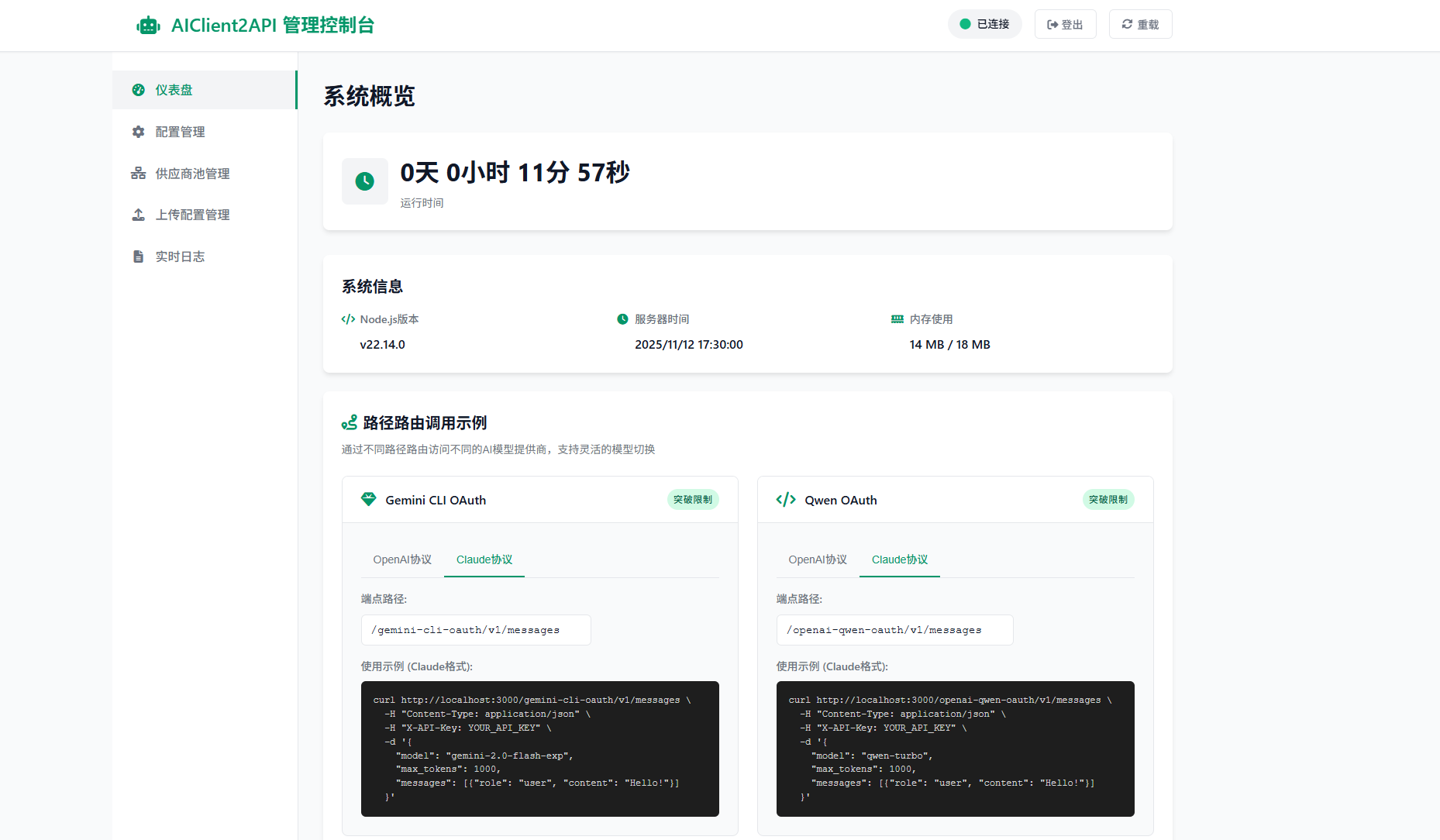
A comprehensive web-based management interface offering:
**📊 Dashboard**: System overview, interactive routing examples, and client configuration guides
**⚙️ Configuration**: Real-time parameter modification for all providers (Gemini, OpenAI, Claude, Kiro, Qwen) with advanced settings and file upload support
**🔗 Provider Pools**: Monitor active connections, provider health statistics, and enable/disable providers
**📁 Config Files**: Centralized OAuth credential management with search, filtering, and file operations
**📜 Logs**: Real-time system and request logs with management controls
**🔐 Login**: Authentication required (default: `admin123`, modify via `pwd` file)
Access: `http://localhost:3000` → Login → Sidebar navigation → Immediate effect changes
#### MCP Protocol Support
This project is fully compatible with **Model Context Protocol (MCP)**, enabling seamless integration with MCP-supporting clients for powerful functional extensions.
#### Multimodal Input Capabilities
Supports various input types including images and documents, providing richer interactive experiences and more powerful application scenarios.
#### Latest Model Support
Seamlessly supports the following latest large models, simply configure the corresponding OpenAI or Claude compatible interface in [`config.json`](./config.json):
* **Kimi K2** - Moonshot AI's latest flagship model
* **GLM-4.5** - Zhipu AI's latest version
* **Qwen Code** - Alibaba Tongyi Qianwen code-specific model
* **Gemini 3** - Google's latest preview model
* **Claude Sonnet 4.5** - Anthropic's latest flagship model
---
### 🔐 Authorization Configuration Guide
#### Gemini CLI OAuth Configuration
1. **Obtain OAuth Credentials**: Visit [Google Cloud Console](https://console.cloud.google.com/) to create a project and enable Gemini API
2. **First Authorization**: After using Gemini service, the command line will print Google authorization page, copy the page to browser for authorization, then return to command line
3. **Credential Storage**: After successful authorization, `oauth_creds.json` file will be automatically generated and saved to `~/.gemini` directory
4. **Project Configuration**: Need to provide a valid Google Cloud project ID, can be specified via startup parameter `--project-id`
#### Qwen Code OAuth Configuration
1. **First Authorization**: After starting the service, the system will automatically open the authorization page in the browser
2. **Credential Storage**: After successful authorization, `oauth_creds.json` file will be automatically generated and saved to `~/.qwen` directory
3. **Recommended Parameters**: Use official default parameters for best results
```json
{
"temperature": 0,
"top_p": 1
}
```
#### Kiro API Configuration
1. **Environment Preparation**: [Download and install Kiro client](https://aibook.ren/archives/kiro-install)
2. **Complete Authorization**: Log in to your account in the client to generate `kiro-auth-token.json` credential file
3. **Best Practice**: Recommended to use with **Claude Code** for optimal experience
4. **Important Notice**: Kiro service usage policy has been updated, please visit the official website for the latest usage restrictions and terms
#### Account Pool Management Configuration
1. **Create Pool Configuration File**: Create a configuration file referencing [provider_pools.json.example](./provider_pools.json.example)
2. **Configure Pool Parameter**: Set `PROVIDER_POOLS_FILE_PATH` in config.json to point to the pool configuration file
3. **Startup Parameter Configuration**: Use `--provider-pools-file