# Supabase Setup and Usage Guide
## Prerequisites for running Supabase:
- Docker Desktop (or Docker Engine + Docker Compose on Linux)
- Supabase CLI
## Installation
1. **Install Supabase CLI**
```bash
# Using NPM
npm install -g supabase
# Using Homebrew (macOS)
brew install supabase/tap/supabase
```
2. **Start Supabase locally**
```bash
# Navigate to your project
cd ElatoAI
# Start Supabase local development
supabase start
```
3. **Verify installation**
The output should show local endpoints including:
- API URL: http://127.0.0.1:54321
- Studio URL: http://127.0.0.1:54323
- JWT secret: super-secret-jwt-token-with-at-least-32-characters-long
## Configuration
1. **Environment variables**
Add these to your `.env.local` and `.env` file in `frontend-nextjs` and `server-deno` respectively:
```
SUPABASE_URL=http://127.0.0.1:54321
SUPABASE_KEY=eyJhbGciOiJIUzI1NiIsInR5cCI6IkpXVCJ9...
JWT_SECRET_KEY=super-secret-jwt-token-with-at-least-32-characters-long
```
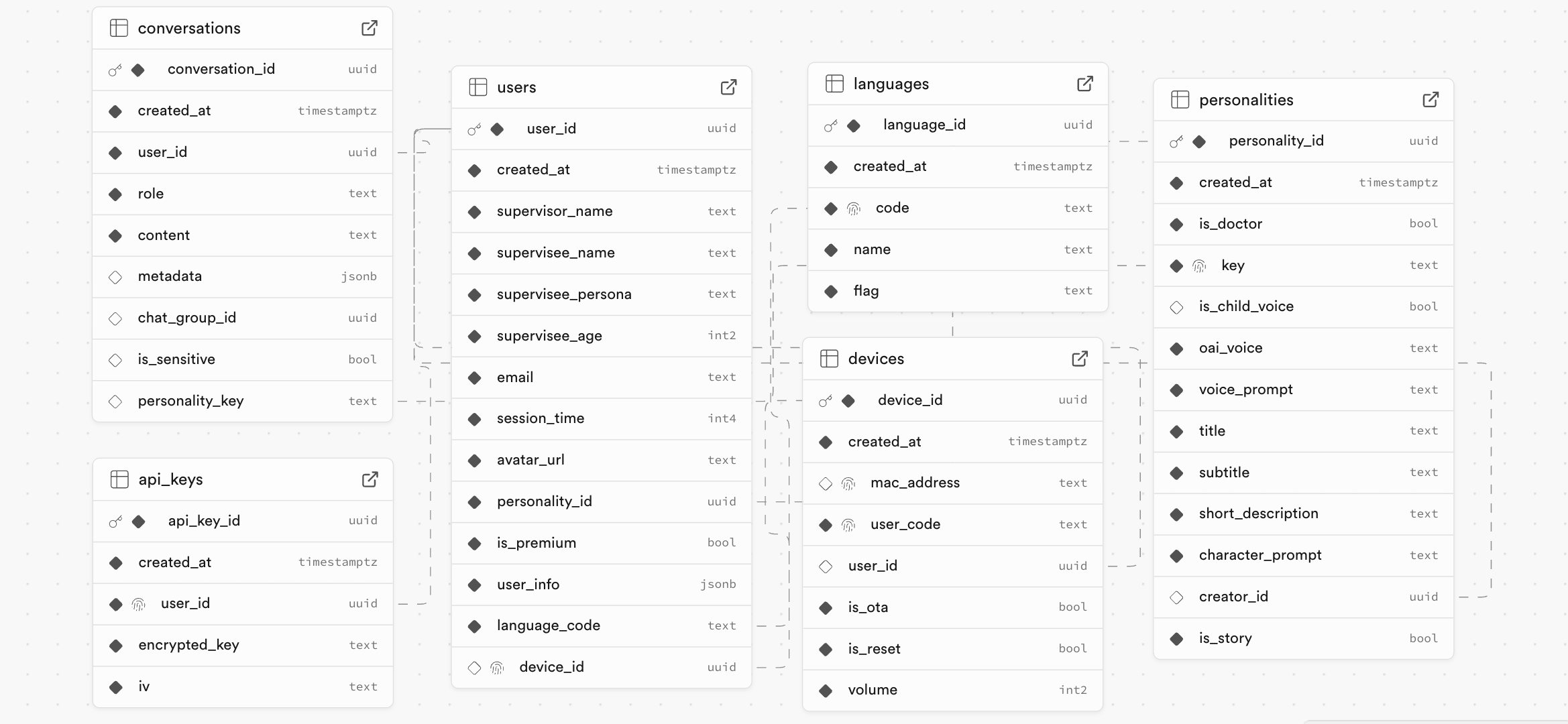
## Tables chart
View a live chart of the tables and their relationships [here](http://localhost:54323/project/default/database/schemas)
 ## Tables
1. `users` - user details are stored here
2. `devices` - device details (mac address, device name, etc) are stored here
3. `conversations` - conversation details (start time, end time, etc) are stored here
4. `messages` - all conversations and transcripts are stored here
5. `api_keys` - api keys are stored here (not used for local development)
6. `languages` - all supported languages are stored here
## Development Workflow
1. Make schema changes in Supabase Studio (http://127.0.0.1:54323)
2. Generate migrations: `supabase db diff -f `
3. Apply to local database: `supabase migration up`
4. Push changes to production when ready
## Deploying to your own supabase instance
1. Create a new supabase project
2. Copy the supabase url and anon key
3. Paste them in the `.env` and `.env.local` file in the root of the project
4. Link the project to the new supabase instance: `supabase link --project-ref `
5. Run `supabase db push --include-seed` to push the changes to the local database and seed the database with the data in `supabase/seed.sql`
## Stopping Supabase
```bash
supabase stop
```
For more details, visit the [Supabase documentation](https://supabase.com/docs).
## Tables
1. `users` - user details are stored here
2. `devices` - device details (mac address, device name, etc) are stored here
3. `conversations` - conversation details (start time, end time, etc) are stored here
4. `messages` - all conversations and transcripts are stored here
5. `api_keys` - api keys are stored here (not used for local development)
6. `languages` - all supported languages are stored here
## Development Workflow
1. Make schema changes in Supabase Studio (http://127.0.0.1:54323)
2. Generate migrations: `supabase db diff -f `
3. Apply to local database: `supabase migration up`
4. Push changes to production when ready
## Deploying to your own supabase instance
1. Create a new supabase project
2. Copy the supabase url and anon key
3. Paste them in the `.env` and `.env.local` file in the root of the project
4. Link the project to the new supabase instance: `supabase link --project-ref `
5. Run `supabase db push --include-seed` to push the changes to the local database and seed the database with the data in `supabase/seed.sql`
## Stopping Supabase
```bash
supabase stop
```
For more details, visit the [Supabase documentation](https://supabase.com/docs).