| .. | ||
| migrations | ||
| .gitignore | ||
| config.toml | ||
| README.md | ||
| seed.sql | ||
| tables.png | ||


Supabase Setup and Usage Guide
Installation
-
Install Supabase CLI
# Using NPM npm install -g supabase # Using Homebrew (macOS) brew install supabase/tap/supabase -
Start Supabase locally
# Navigate to your project cd ElatoAI # Start Supabase local development supabase start -
Verify installation The output should show local endpoints including:
- API URL: http://127.0.0.1:54321
- Studio URL: http://127.0.0.1:54323
- JWT secret: super-secret-jwt-token-with-at-least-32-characters-long
Configuration
- Environment variables
Add these to your
.env.localand.envfile infrontend-nextjsandserver-denorespectively:SUPABASE_URL=http://127.0.0.1:54321 SUPABASE_KEY=eyJhbGciOiJIUzI1NiIsInR5cCI6IkpXVCJ9... JWT_SECRET=super-secret-jwt-token-with-at-least-32-characters-long
Tables chart
View a live chart of the tables and their relationships here
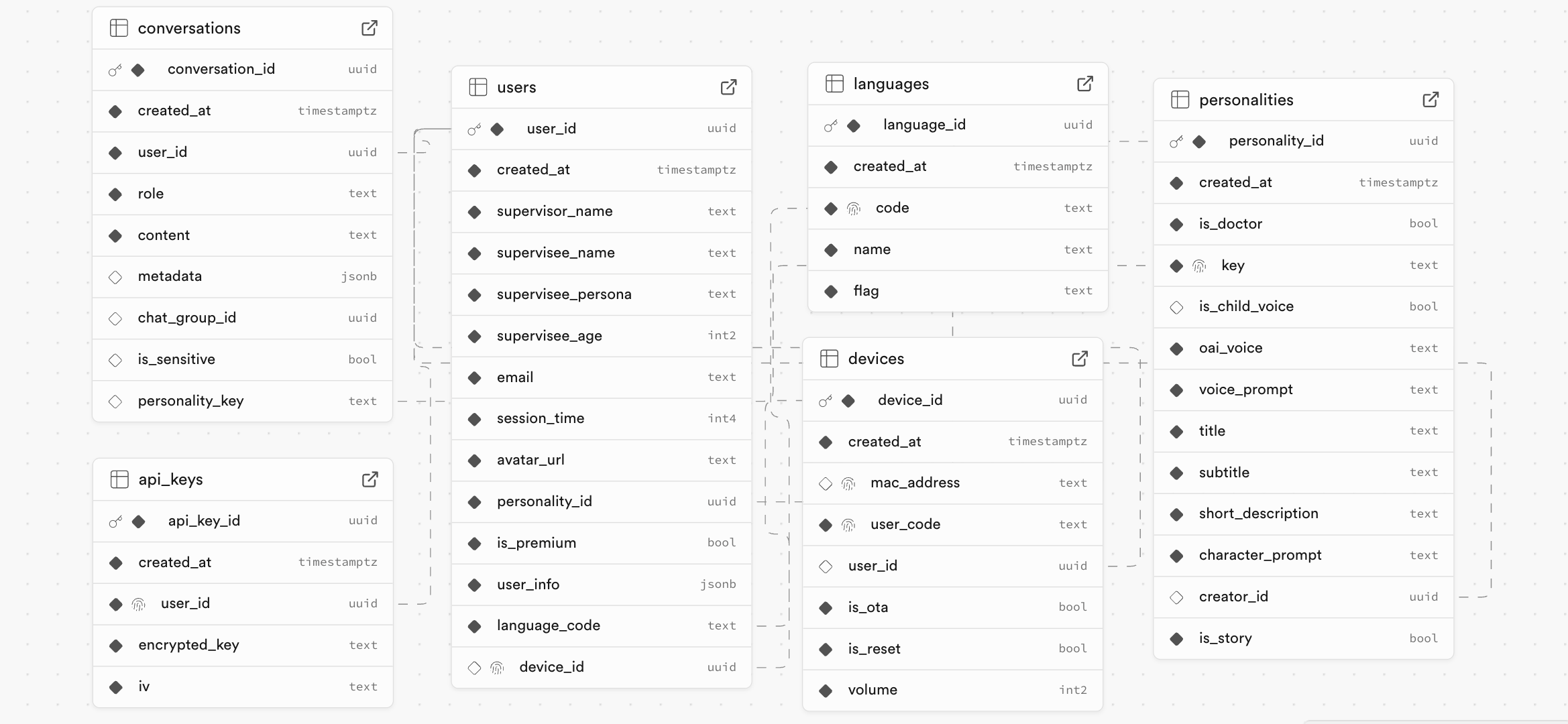
Tables
users- user details are stored heredevices- device details (mac address, device name, etc) are stored hereconversations- conversation details (start time, end time, etc) are stored heremessages- all conversations and transcripts are stored hereapi_keys- api keys are stored here (not used for local development)languages- all supported languages are stored here
Development Workflow
- Make schema changes in Supabase Studio (http://127.0.0.1:54323)
- Generate migrations:
supabase db diff -f <migration_name> - Apply to local database:
supabase migration up - Push changes to production when ready
Stopping Supabase
supabase stop
For more details, visit the Supabase documentation.