| .vscode | ||
| firmware-arduino | ||
| frontend-nextjs | ||
| server-deno | ||
| supabase | ||
| .DS_Store | ||
| elato-ai-device.jpeg | ||
| elato-ai-devkit.png | ||
| LICENSE | ||
| pcb-design.png | ||
| README.md | ||

🚀 ElatoAI: Realtime AI Speech for ESP32
Realtime AI Speech powered by OpenAI Realtime API, ESP32, Secure WebSockets, and Deno Edge Functions for >10-minute uninterrupted global conversations




📽️ Demo Video
https://github.com/user-attachments/assets/aa60e54c-5847-4a68-80b5-5d6b1a5b9328



⚡️ DIY Hardware Design
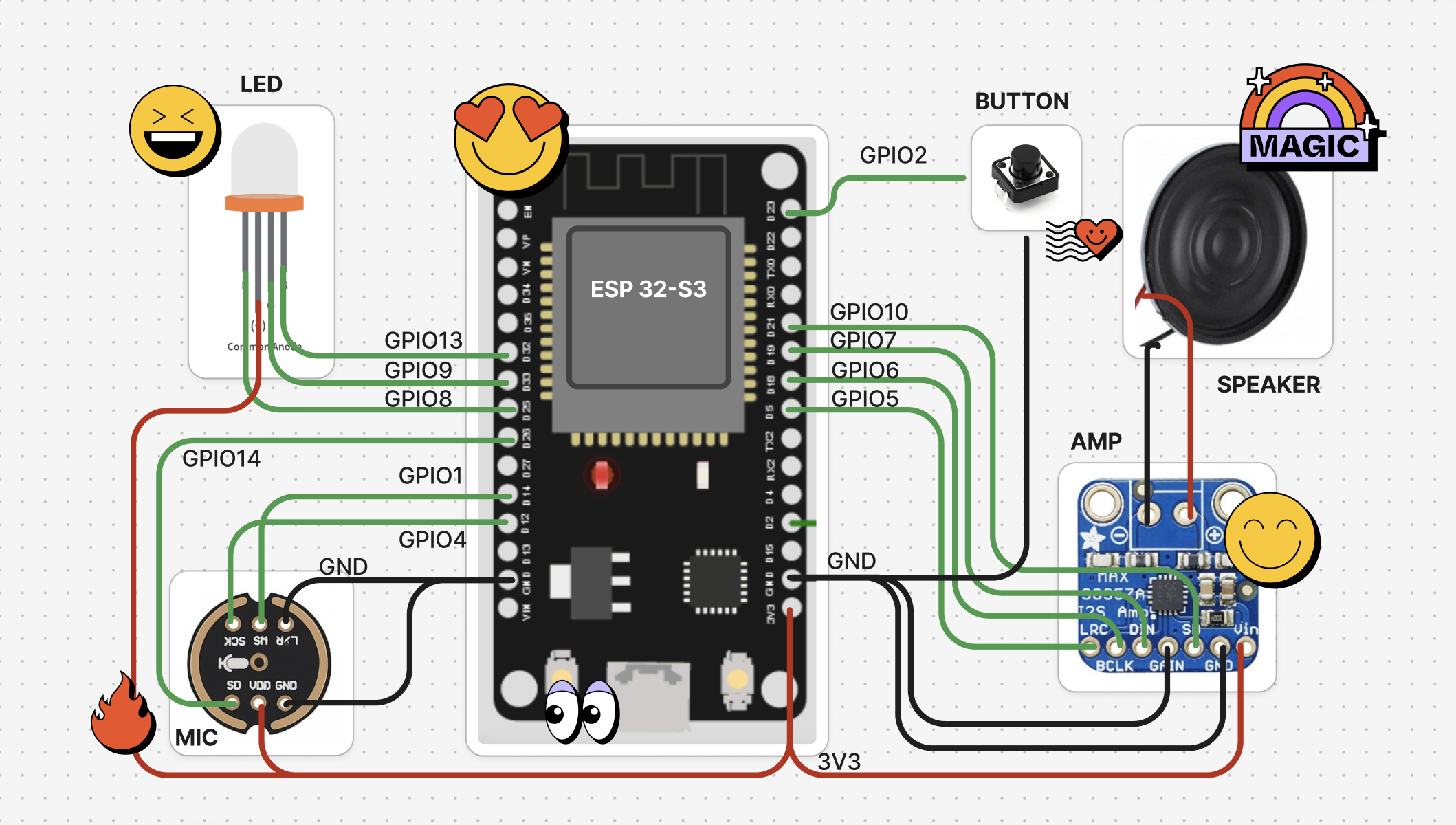
Getting Started
- Install Supabase CLI and set up your Local Supabase Backend. From the root directory, run:
brew install supabase/tap/supabase
supabase start # Starts your local Supabase server with the default migrations and seed data.
- Set up your NextJS Frontend. (See the Frontend README) From the
frontend-nextjsdirectory, run the following commands. (Login creds: Email: admin@elatoai.com, Password: admin)
cd frontend-nextjs
npm install

# Set your environment variables
cp .env.example .env.local
# NEXT_PUBLIC_SUPABASE_ANON_KEY=<your_supabase_anon_key>
# OPENAI_API_KEY=<your_openai_api_key>

# Run the development server
npm run dev
-
Add your ESP32-S3 Device MAC Address to the Settings page in the NextJS Frontend. This links your device to your account. To find your ESP32-S3 Device's MAC Address, build and upload
test/print_mac_address_test.cppusing PlatformIO. -
Start the Deno server. (See the Deno server README)
# Navigate to the server directory
cd server-deno

# Set your environment variables
cp .env.example .env
# NEXT_PUBLIC_SUPABASE_ANON_KEY=<your_supabase_anon_key>
# OPENAI_API_KEY=<your_openai_api_key>

# Run the server at port 8000
deno run -A --env-file=.env main.ts
- Add your OpenAI API Key in the
server-deno/.envandfrontend-nextjs/.env.localfile.
OPENAI_API_KEY=<your_openai_api_key>
-
Set up your ESP32 Arduino Client. (See the ESP32 README) On PlatformIO, first
Buildthe project, thenUploadthe project to your ESP32. -
The ESP32 should open an AP
ELATO-DEVICEto connect to Wifi. Connect to it and go tohttp://192.168.4.1to configure the device wifi. -
Once your Wifi is configured, turn the device off and on again and it should connect to your Wifi and the Deno edge server.
-
Now you can talk to your AI Character!
Project Architecture
ElatoAI consists of three main components:
- Frontend Client (
Next.jshosted on Vercel) - to create and talk to your AI agents and 'send' it to your ESP32 device - Edge Server Functions (
Denorunning on Deno/Supabase Edge) - to handle the websocket connections from the ESP32 device and the OpenAI API calls - ESP32 IoT Client (
PlatformIO/Arduino) - to receive the websocket connections from the Edge Server Functions and send audio to the OpenAI API via the Deno edge server.
🌟 Features
- Realtime Speech-to-Speech: Instant speech conversion powered by OpenAI's Realtime APIs.
- Create Custom AI Agents: Create custom agents with different personalities and voices.
- Customizable Voices: Choose from a variety of voices and personalities.
- Secure WebSockets: Reliable, encrypted WebSocket communication.
- Server VAD Turn Detection: Intelligent conversation flow handling for smooth interactions.
- Opus Audio Compression: High-quality audio streaming with minimal bandwidth.
- Global Edge Performance: Low latency Deno Edge Functions ensuring seamless global conversations.
- ESP32 Arduino Framework: Optimized and easy-to-use hardware integration.
- Conversation History: View your conversation history.
- Device Management: Register and manage your devices.
- User Authentication: Secure user authentication and authorization.
- Conversations with WebRTC and Websockets: Talk to your AI with WebRTC on the NextJS webapp and with websockets on the ESP32.
- Volume Control: Control the volume of the ESP32 speaker from the NextJS webapp.
- Realtime Transcripts: The realtime transcripts of your conversations are stored in the Supabase DB.
- OTA Updates: Over the Air Updates for the ESP32 firmware.
- Wifi Management: Connect to your Wifi network from the ESP32 device.
- Factory Reset: Factory reset the ESP32 device from the NextJS webapp.
- Button and Touch Support: Use the button OR touch sensor to control the ESP32 device.
🛠 Tech Stack
| Component | Technology Used |
|---|---|
| Frontend | Next.js, Vercel |
| Backend | Supabase DB |
| Edge Functions | Deno Edge Functions on Deno/Supabase |
| IoT Client | PlatformIO, Arduino Framework, ESP32-S3 |
| Audio Codec | Opus |
| Communication | Secure WebSockets |
| Libraries | ArduinoJson, WebSockets, AsyncWebServer, ESP32_Button, Arduino Audio Tools, ArduinoLibOpus |
🗺️ High-Level Flow
flowchart TD
  User[User Speech] --> ESP32
  ESP32[ESP32 Device] -->|WebSocket| Edge[Deno Edge Function]
  Edge -->|OpenAI API| OpenAI[OpenAI Realtime API]
  OpenAI --> Edge
  Edge -->|WebSocket| ESP32
  ESP32 --> User[AI Generated Speech]
Project Structure
graph TD
  repo[ElatoAI]
  repo --> frontend[Frontend Vercel NextJS]
  repo --> deno[Deno Edge Function]
  repo --> esp32[ESP32 Arduino Client]
  deno --> supabase[Supabase DB]

  frontend --> supabase
  esp32 --> websockets[Secure WebSockets]
  esp32 --> opus[Opus Codec]
  esp32 --> audio_tools[arduino-audio-tools]
  esp32 --> libopus[arduino-libopus]
  esp32 --> ESPAsyncWebServer[ESPAsyncWebServer]
⚙️ PlatformIO Configuration
[env:esp32-s3-devkitc-1]
platform = espressif32 @ 6.10.0
board = esp32-s3-devkitc-1
framework = arduino
monitor_speed = 115200

lib_deps =
    bblanchon/ArduinoJson@^7.1.0
    links2004/WebSockets@^2.4.1
    ESP32Async/ESPAsyncWebServer@^3.7.6
    https://github.com/esp-arduino-libs/ESP32_Button.git#v0.0.1
    https://github.com/pschatzmann/arduino-audio-tools.git#v1.0.1
    https://github.com/pschatzmann/arduino-libopus.git#a1.1.0
📊 Important Stats
- ⚡️ Latency: <1s round-trip globally
- 🎧 Audio Quality: Opus codec at 24kbps (high clarity)
- ⏳ Uninterrupted Conversations: Up to 10 minutes continuous conversations
- 🌎 Global Availability: Optimized with edge computing with Deno
🛡 Security
- Secure WebSockets (WSS) for encrypted data transfers
- Optional: API Key encryption with 256-bit AES
- Supabase DB for secure authentication
- Supabase RLS for all tables
🚫 Limitations
- 3-4s Cold start time while connecting to edge server
- Limited to upto 10 minutes of uninterrupted conversations
- Edge server stops when wall clock time is exceeded
- No speech interruption detection on ESP32
🤝 Contributing
- Looking for Speech Interruption detection on ESP32
- Adding Arduino IDE support
- Adding tool calling support on Deno Edge
We welcome contributions
- Fork this repository.
- Create your feature branch (
git checkout -b feature/EpicFeature). - Commit your changes (
git commit -m 'Add EpicFeature'). - Push to the branch (
git push origin feature/EpicFeature). - Open a PR
License
This project is licensed under the MIT License - see the LICENSE file for details.
If you find this project interesting or useful, drop a GitHub ⭐️. It helps a lot!