 df0986cee0
* fix: small issue where users cant change podcast segments * feat: display source and note counts on notebook cards (OSS-312) Add item counters to notebook listing page showing the number of sources and notes in each notebook. Counts are displayed in a footer section with FileText and StickyNote icons for visual consistency with ContextIndicator. Backend changes: - Add source_count and note_count to NotebookResponse model - Update /notebooks endpoint to use SurrealDB graph traversal query - Query: count(<-reference.in) for sources, count(<-artifact.in) for notes - Update all notebook endpoints to include counts Frontend changes: - Add source_count and note_count to TypeScript NotebookResponse interface - Add footer section to NotebookCard component - Display counts with FileText and StickyNote icons (h-3 w-3) - Use border-top separator and muted-foreground styling Generated with [Claude Code](https://claude.com/claude-code) Co-Authored-By: Claude <noreply@anthropic.com> * style: use colorful badges for notebook counts matching ContextIndicator Update notebook card counts to use Badge components with primary color styling instead of plain text, matching the visual style of the ContextIndicator component in the chat window. Changes: - Replace plain text divs with Badge components - Apply text-primary and border-primary/50 styling - Use same spacing (gap-1.5, px-1.5, py-0.5) as ContextIndicator - Remove bullet separator (not needed with badge layout) Visual result matches the colorful badges shown in chat context. Generated with [Claude Code](https://claude.com/claude-code) Co-Authored-By: Claude <noreply@anthropic.com> --------- Co-authored-by: Claude <noreply@anthropic.com> |
||
|---|---|---|
| .github | ||
| api | ||
| commands | ||
| docs | ||
| frontend | ||
| migrations | ||
| open_notebook | ||
| prompts | ||
| scripts | ||
| setup_guide | ||
| tests | ||
| .dockerignore | ||
| .env.example | ||
| .gitignore | ||
| .python-version | ||
| batch_fix_services.py | ||
| CONFIGURATION.md | ||
| CONTRIBUTING.md | ||
| docker-compose.dev.yml | ||
| docker-compose.full.yml | ||
| docker-compose.single.yml | ||
| Dockerfile | ||
| Dockerfile.single | ||
| LICENSE | ||
| logo.png | ||
| Makefile | ||
| MIGRATION.md | ||
| mypy.ini | ||
| pyproject.toml | ||
| README.md | ||
| run_api.py | ||
| supervisord.conf | ||
| supervisord.single.conf | ||
| uv.lock | ||





Open Notebook
An open source, privacy-focused alternative to Google's Notebook LM!
Join our Discord server for help, to share workflow ideas, and suggest features!
Checkout our website »
📚 Get Started
·
📖 User Guide
·
✨ Features
·
🚀 Deploy
A private, multi-model, 100% local, full-featured alternative to Notebook LM
In a world dominated by Artificial Intelligence, having the ability to think 🧠 and acquire new knowledge 💡, is a skill that should not be a privilege for a few, nor restricted to a single provider.
Open Notebook empowers you to:
- 🔒 Control your data - Keep your research private and secure
- 🤖 Choose your AI models - Support for 16+ providers including OpenAI, Anthropic, Ollama, LM Studio, and more
- 📚 Organize multi-modal content - PDFs, videos, audio, web pages, and more
- 🎙️ Generate professional podcasts - Advanced multi-speaker podcast generation
- 🔍 Search intelligently - Full-text and vector search across all your content
- 💬 Chat with context - AI conversations powered by your research
Learn more about our project at https://www.open-notebook.ai
⚠️ IMPORTANT: v1.0 Breaking Changes
If you're upgrading from a previous version, please note:
- 🏷️ Docker tags have changed: The
latesttag is now frozen at the last Streamlit version - 🆕 Use
v1-latesttag for the new React/Next.js version (recommended) - 🔌 Port 5055 required: You must expose port 5055 for the API to work
- 📖 Read the migration guide: See MIGRATION.md for detailed upgrade instructions
New users: You can ignore this notice and proceed with the Quick Start below using the v1-latest-single tag.
🆚 Open Notebook vs Google Notebook LM
| Feature | Open Notebook | Google Notebook LM | Advantage |
|---|---|---|---|
| Privacy & Control | Self-hosted, your data | Google cloud only | Complete data sovereignty |
| AI Provider Choice | 16+ providers (OpenAI, Anthropic, Ollama, LM Studio, etc.) | Google models only | Flexibility and cost optimization |
| Podcast Speakers | 1-4 speakers with custom profiles | 2 speakers only | Extreme flexibility |
| Context Control | 3 granular levels | All-or-nothing | Privacy and performance tuning |
| Content Transformations | Custom and built-in | Limited options | Unlimited processing power |
| API Access | Full REST API | No API | Complete automation |
| Deployment | Docker, cloud, or local | Google hosted only | Deploy anywhere |
| Citations | Comprehensive with sources | Basic references | Research integrity |
| Customization | Open source, fully customizable | Closed system | Unlimited extensibility |
| Cost | Pay only for AI usage | Monthly subscription + usage | Transparent and controllable |
Why Choose Open Notebook?
- 🔒 Privacy First: Your sensitive research stays completely private
- 💰 Cost Control: Choose cheaper AI providers or run locally with Ollama
- 🎙️ Better Podcasts: Full script control and multi-speaker flexibility vs limited 2-speaker deep-dive format
- 🔧 Unlimited Customization: Modify, extend, and integrate as needed
- 🌐 No Vendor Lock-in: Switch providers, deploy anywhere, own your data
Built With




🚀 Quick Start
Docker Images Available:
- Docker Hub:
lfnovo/open_notebook:v1-latest-single - GitHub Container Registry:
ghcr.io/lfnovo/open-notebook:v1-latest-single
Both registries contain identical images - choose whichever you prefer!
Ready to try Open Notebook? Choose your preferred method:
⚡ Instant Setup (Recommended)
# Create a new directory for your Open Notebook installation
mkdir open-notebook
cd open-notebook

# Using Docker - Get started in 2 minutes
docker run -d \
  --name open-notebook \
  -p 8502:8502 -p 5055:5055 \
  -v ./notebook_data:/app/data \
  -v ./surreal_data:/mydata \
  -e OPENAI_API_KEY=your_key \
  lfnovo/open_notebook:v1-latest-single

# Or use GitHub Container Registry:
# ghcr.io/lfnovo/open-notebook:v1-latest-single
What gets created:
open-notebook/
├── notebook_data/     # Your notebooks and research content
└── surreal_data/      # Database files
Access your installation:
- 🖥️ Main Interface: http://localhost:8502 (Next.js UI)
- 🔧 API Access: http://localhost:5055 (REST API)
- 📚 API Documentation: http://localhost:5055/docs (Interactive Swagger UI)
⚠️ Important:
- Run from a dedicated folder: Create and run this from inside a new
open-notebookfolder so your data volumes are properly organized- Volume persistence: The volumes (
-v ./notebook_data:/app/dataand-v ./surreal_data:/mydata) are essential to persist your data between container restarts. Without them, you'll lose all your notebooks and research when the container stops.
🛠️ Full Installation
For development or customization:
git clone https://github.com/lfnovo/open-notebook
cd open-notebook
make start-all
📖 Need Help?
- 🤖 AI Installation Assistant: We have a CustomGPT built to help you install Open Notebook - it will guide you through each step!
- New to Open Notebook? Start with our Getting Started Guide
- Need installation help? Check our Installation Guide
- Want to see it in action? Try our Quick Start Tutorial
Provider Support Matrix
Thanks to the Esperanto library, we support this providers out of the box!
| Provider | LLM Support | Embedding Support | Speech-to-Text | Text-to-Speech |
|---|---|---|---|---|
| OpenAI | ✅ | ✅ | ✅ | ✅ |
| Anthropic | ✅ | ❌ | ❌ | ❌ |
| Groq | ✅ | ❌ | ✅ | ❌ |
| Google (GenAI) | ✅ | ✅ | ❌ | ✅ |
| Vertex AI | ✅ | ✅ | ❌ | ✅ |
| Ollama | ✅ | ✅ | ❌ | ❌ |
| Perplexity | ✅ | ❌ | ❌ | ❌ |
| ElevenLabs | ❌ | ❌ | ✅ | ✅ |
| Azure OpenAI | ✅ | ✅ | ❌ | ❌ |
| Mistral | ✅ | ✅ | ❌ | ❌ |
| DeepSeek | ✅ | ❌ | ❌ | ❌ |
| Voyage | ❌ | ✅ | ❌ | ❌ |
| xAI | ✅ | ❌ | ❌ | ❌ |
| OpenRouter | ✅ | ❌ | ❌ | ❌ |
| OpenAI Compatible* | ✅ | ❌ | ❌ | ❌ |
*Supports LM Studio and any OpenAI-compatible endpoint
✨ Key Features
Core Capabilities
- 🔒 Privacy-First: Your data stays under your control - no cloud dependencies
- 🎯 Multi-Notebook Organization: Manage multiple research projects seamlessly
- 📚 Universal Content Support: PDFs, videos, audio, web pages, Office docs, and more
- 🤖 Multi-Model AI Support: 16+ providers including OpenAI, Anthropic, Ollama, Google, LM Studio, and more
- 🎙️ Professional Podcast Generation: Advanced multi-speaker podcasts with Episode Profiles
- 🔍 Intelligent Search: Full-text and vector search across all your content
- 💬 Context-Aware Chat: AI conversations powered by your research materials
- 📝 AI-Assisted Notes: Generate insights or write notes manually
Advanced Features
- ⚡ Reasoning Model Support: Full support for thinking models like DeepSeek-R1 and Qwen3
- 🔧 Content Transformations: Powerful customizable actions to summarize and extract insights
- 🌐 Comprehensive REST API: Full programmatic access for custom integrations
- 🔐 Optional Password Protection: Secure public deployments with authentication
- 📊 Fine-Grained Context Control: Choose exactly what to share with AI models
- 📎 Citations: Get answers with proper source citations


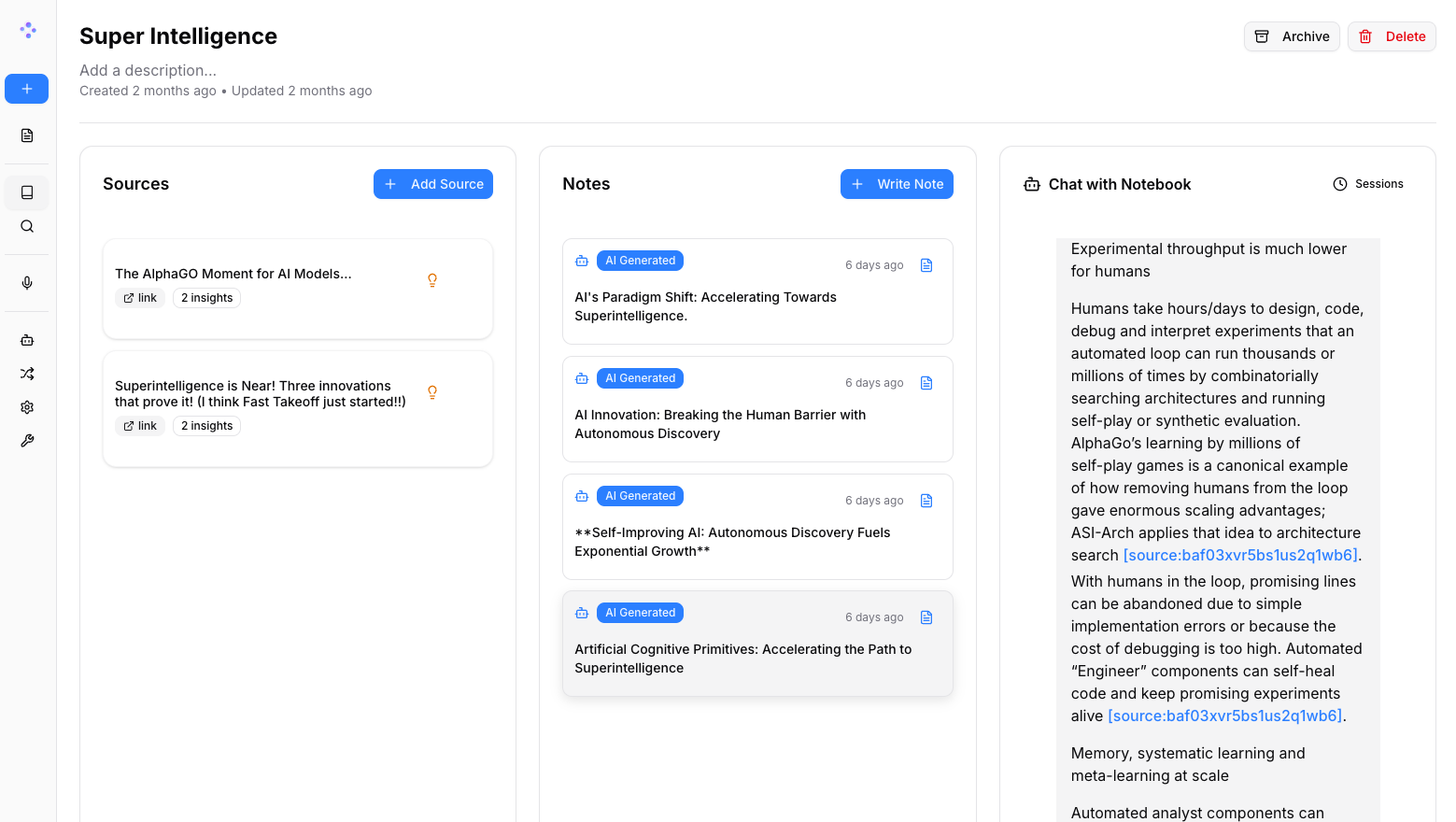
Three-Column Interface
- Sources: Manage all your research materials
- Notes: Create manual or AI-generated notes
- Chat: Converse with AI using your content as context

📚 Documentation
Getting Started
- 📖 Introduction - Learn what Open Notebook offers
- ⚡ Quick Start - Get up and running in 5 minutes
- 🔧 Installation - Comprehensive setup guide
- 🎯 Your First Notebook - Step-by-step tutorial
User Guide
- 📱 Interface Overview - Understanding the layout
- 📚 Notebooks - Organizing your research
- 📄 Sources - Managing content types
- 📝 Notes - Creating and managing notes
- 💬 Chat - AI conversations
- 🔍 Search - Finding information
Advanced Topics
- 🎙️ Podcast Generation - Create professional podcasts
- 🔧 Content Transformations - Customize content processing
- 🤖 AI Models - AI model configuration
- 🔧 REST API Reference - Complete API documentation
- 🔐 Security - Password protection and privacy
- 🚀 Deployment - Complete deployment guides for all scenarios
🗺️ Roadmap
Upcoming Features
- Live Front-End Updates: Real-time UI updates for smoother experience
- Async Processing: Faster UI through asynchronous content processing
- Cross-Notebook Sources: Reuse research materials across projects
- Bookmark Integration: Connect with your favorite bookmarking apps
Recently Completed ✅
- Next.js Frontend: Modern React-based frontend with improved performance
- Comprehensive REST API: Full programmatic access to all functionality
- Multi-Model Support: 16+ AI providers including OpenAI, Anthropic, Ollama, LM Studio
- Advanced Podcast Generator: Professional multi-speaker podcasts with Episode Profiles
- Content Transformations: Powerful customizable actions for content processing
- Enhanced Citations: Improved layout and finer control for source citations
- Multiple Chat Sessions: Manage different conversations within notebooks
See the open issues for a full list of proposed features and known issues.
🤝 Community & Contributing
Join the Community
- 💬 Discord Server - Get help, share ideas, and connect with other users
- 🐛 GitHub Issues - Report bugs and request features
- ⭐ Star this repo - Show your support and help others discover Open Notebook
Contributing
We welcome contributions! We're especially looking for help with:
- Frontend Development: Help improve our modern Next.js/React UI
- Testing & Bug Fixes: Make Open Notebook more robust
- Feature Development: Build the coolest research tool together
- Documentation: Improve guides and tutorials
Current Tech Stack: Python, FastAPI, Next.js, React, SurrealDB Future Roadmap: Real-time updates, enhanced async processing
See our Contributing Guide for detailed information on how to get started.
📄 License
Open Notebook is MIT licensed. See the LICENSE file for details.
📞 Contact
Luis Novo - @lfnovo
Community Support:
- 💬 Discord Server - Get help, share ideas, and connect with users
- 🐛 GitHub Issues - Report bugs and request features
- 🌐 Website - Learn more about the project
🙏 Acknowledgments
Open Notebook is built on the shoulders of amazing open-source projects:
- Podcast Creator - Advanced podcast generation capabilities
- Surreal Commands - Background job processing
- Content Core - Content processing and management
- Esperanto - Multi-provider AI model abstraction
- Docling - Document processing and parsing