 d7b0fff954
Creates the API layer for Open Notebook
Creates a services API gateway for the Streamlit front-end
Migrates the SurrealDB SDK to the official one
Change all database calls to async
New podcast framework supporting multiple speaker configurations
Implement the surreal-commands library for async processing
Improve docker image and docker-compose configurations
6 KiB
Podcast Generator
Open Notebook's Podcast Generator creates professional, multi-speaker podcasts from your research content. With our Episode Profile system, you can generate high-quality podcasts in just 3 clicks - no complex configuration required.
🎯 More Flexible: Unlike Google Notebook LM's fixed 2-host format, Open Notebook supports 1-4 speakers with complete customization of personalities, voices, and conversation styles.
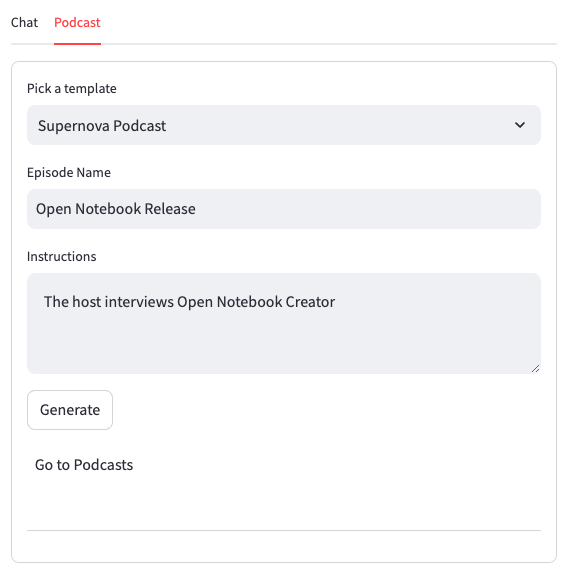
🎬 3-Click Podcast Generation
Step 1: Choose Episode Profile
Select from pre-configured podcast styles:
- Tech Discussion: 2 technical experts discussing complex topics
- Solo Expert: Single expert explaining concepts in an accessible way
- Business Analysis: Business-focused panel discussion
- Interview Style: Host interviewing a subject matter expert
Or configure your own.
Step 2: Name Your Episode
Give your podcast a descriptive name that reflects the content.
Step 3: Generate
Click "Generate Podcast" and continue using Open Notebook while your podcast processes in the background (2-3 minutes).
🎙️ Episode Profiles vs Traditional Setup
Before (15+ Fields):
- Manual speaker role configuration
- Complex conversation style settings
- Detailed voice and personality setup
- Dialogue structure customization
- Provider and model selection
Now (Episode Profiles):
- Pre-configured professional templates
- Optimized speaker combinations
- Battle-tested conversation flows
- One-click generation with optional customization
🔄 Background Processing
Non-Blocking Experience
- Podcasts generate in the background
- Continue your research while processing
- Simple status tracking without complexity
- Desktop notifications when complete
Job Status Tracking
Monitor your podcast generation:
- Pending: Job queued for processing
- Running: Currently generating (outline → transcript → audio)
- Completed: Ready to listen and download
- Failed: Error details for troubleshooting

🎨 Customization Options
Speaker Configurations
- Solo Format: Single expert with rich personality
- Dual Speakers: Two complementary perspectives
- Panel Discussion: 3-4 speakers with diverse viewpoints
- Interview Style: Host + guest dynamic
Voice & Personality
Each speaker profile includes:
- Voice Selection: Choose from multiple TTS providers
- Personality Traits: Optimized speaking styles
- Backstory: Rich character development
- Role Definition: Clear expert positioning
Content Adaptation
- Automatic Briefing: Context-aware content adaptation
- Segment Structure: Optimized for engagement
- Conversation Flow: Natural dialogue patterns
- Fact Integration: Seamless research incorporation
🛠️ Advanced Features
Multi-Provider Support
Choose your preferred AI and TTS providers:
- Language Models: OpenAI, Anthropic, Google, Groq, Ollama
- Text-to-Speech: OpenAI, Google TTS, ElevenLabs
- Local Processing: Full Ollama support for privacy
Custom Episode Profiles
Create your own profiles by combining:
- Speaker configurations (1-4 speakers)
- AI model preferences
- Default briefing templates
- Segment count and structure
Episode Management
- Library View: All episodes organized by notebook
- Audio Player: Integrated playback with controls
- Download Options: Export MP3 for offline listening
- Metadata: Generation details and settings used
📱 Mobile & Accessibility
Audio-First Design
Perfect for:
- Commuting and travel
- Exercise and walking
- Multitasking scenarios
- Visual accessibility needs
Quality Features
- Professional Audio: High-quality TTS with natural speech
- Consistent Pacing: Optimized for comprehension
- Clear Diction: Enhanced pronunciation and clarity
- Background Processing: No interruption to workflow
🔧 Technical Architecture
Background Worker System
- Async Processing: Non-blocking podcast generation
- Queue Management: Reliable job processing
- Error Recovery: Automatic retry and detailed logging
- Scalable Design: Foundation for future features
Integration Points
- Content Pipeline: Seamless notebook content integration
- Search Integration: Generate podcasts from search results
- Transformation System: Part of larger content processing workflow
- API Access: Full programmatic control via REST API
🎧 Sample Podcasts
Listen to examples of what Open Notebook can create:

Generated using custom Episode Profile with ElevenLabs voices and interview format
🚀 Getting Started
- Setup: Ensure you have API keys configured for your preferred providers
- Initialize: Click "Initialize Default Profiles" on first use
- Select Content: Choose notebook with research content
- Generate: Pick profile → name episode → generate
- Listen: Audio appears in episode list when complete
⚡ Pro Tips
Content Optimization
- Rich Source Material: More content = better podcast discussions
- Clear Topics: Focused content creates more engaging conversations
- Mixed Media: Combine text, links, and documents for depth
Profile Selection
- Tech Content: Use "Tech Discussion" for technical deep-dives
- Business Content: Use "Business Analysis" for strategic discussions
- Educational: Use "Solo Expert" for clear explanations
- General: Use "Interview Style" for broad topic exploration
Workflow Integration
- Research → Generate: Create podcasts during active research
- Review Sessions: Generate summaries of completed research
- Learning Path: Create series with consistent Episode Profiles
- Sharing: Export episodes for team knowledge sharing
The Podcast Generator establishes Open Notebook as a superior alternative to Google Notebook LM with unmatched flexibility, quality, and user control.